
New Zealand probate files document court administration of a deceased person’s estate. A probate may contain a submitted will, information about executors and property, and documents the court produced while it processed the estate. It is not a complete list of all people who died. Begin with an independently dated death clue and the locality where an estate may have been administered. Archives New Zealand lists probate material through its Collections search and identifies the court and physical archive in the description. A person who died in one town may have had estate matters conducted elsewhere. Record the specific court rather than assuming today’s nearest archive held the original.
Search the official route to digitized probate images
Archives New Zealand and FamilySearch have a joint digitization project for historical probate files. The archive explains how to search FamilySearch’s dedicated probate collection by name, expand a candidate result and choose “View the original document.” Look for the first and last image numbers supplied with an indexed probate, because multiple files can share an uploaded image group. A search result is not a full will: inspect all images within the record’s stated range. The court order, original will, codicil, administration papers and later endorsements may occur on different pages. Cite the actual image consulted. To go further, our guide “New Zealand Divorce Files Before 1926” shows how to verify petitions and final decrees.
Treat the fifty-year online rule as an access condition
Archives New Zealand says probate files more than 50 years old are being made available free online as they are digitized. This does not mean every qualifying file has already been scanned or indexed. More recent probates are not part of that online public-image route; the archive instructs researchers to contact it about access. Do not calculate access using death date alone: use the actual probate-file date and current repository guidance. Do not promise a remote image if the Collections search has only a catalogue entry or if the record has not yet reached the relevant digitization stage.
Recover an unindexed case by court and file number
The archive provides a specific recovery path when a file is digitized but not name-indexed. First use Archives New Zealand Collections search to identify the probate court, year and case number. An example number format in its guidance is P712/1927. Then choose FamilySearch’s browse-images route, select the court, year and case-number range, and locate the relevant images manually. This is not the same as retrying the surname in a different spelling. Copy the exact court and reference before browsing. If you find a file, compare the printed docket and case details with the catalogued probate before identifying the person.

Understand the geography of physical probate custody
Archives New Zealand notes that probates are held across Auckland, Wellington, Christchurch and Dunedin archives, often near the historical court that made the record. Its regional guide explains that northern North Island files may be held in Auckland; lower North Island and parts of the upper South Island may be in Wellington; Canterbury and the West Coast in Christchurch; and Otago and Southland in Dunedin. This is a routing guide, not a guarantee that every file is in the nearest present-day city. Use the archive named in the particular Collections search result for the actual item. To go further, our guide “South Australia Probate Records, 1844–1916” shows how to find wills and grants.
Separate a will from letters of administration
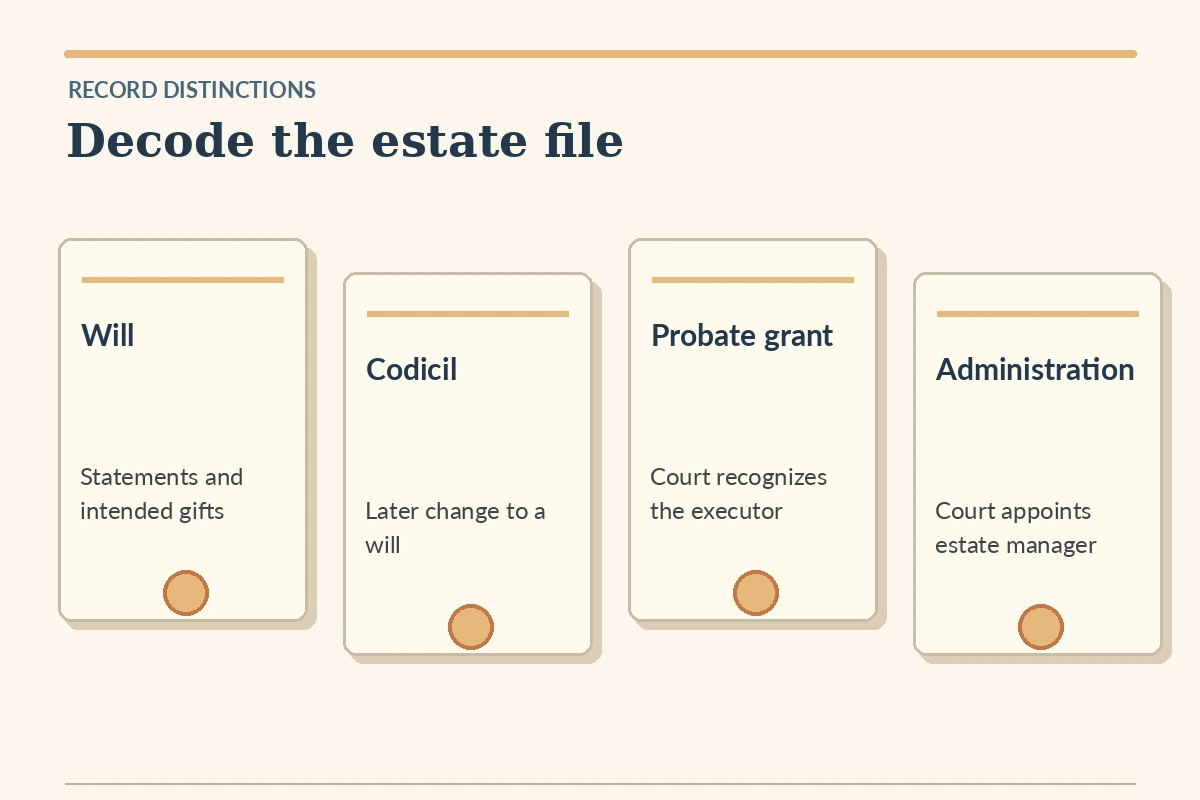
A deceased person may leave a will naming an executor, or an estate may require administration without a probated will. These paths generate different documents. The archive says a will, if submitted to the court, can be included in the probate file; not every file guarantees that a full original will will appear or be legible. Read the grant and any appointment of an administrator before describing the person’s role. A beneficiary is not necessarily a child, and an executor is not necessarily a spouse. Copy each stated relationship exactly and confirm it against births, marriages or other independent records.
Build an event timeline for the estate
Record death, will signing, any codicil, filing, court grant, valuation and later estate correspondence as separate events. A will made years before death may use an obsolete residence, surname or relationship description. A probate application may recite a date supplied by a family member, which should be compared with the civil death record. Do not treat the day a will was signed as the probate date or a filed case number as evidence that an estate was fully distributed. Separating dates prevents the estate’s administrative history from being confused with the person’s life history.
Compare beneficiaries against independently proven family
Imagine a fictional 1919 probate for Alice Turner that names a “niece, E. Turner,” alongside an executor with an unrelated surname. A family tree has an Elizabeth Turner born nearby, but there may be another candidate with the same initial. Read the will’s exact wording, addresses, signature and any accompanying affidavits. Then compare the claimed niece with civil records or independently documented relatives. Do not insert a parent-child link into the tree merely because the will lists a beneficiary. Financial benefit, guardianship and executorship are legal roles; family connection needs the actual words and supporting evidence.
Use the entire image run, not the first sheet
FamilySearch image groups may contain multiple probate cases, and the official guide instructs researchers to use first and last image numbers for a named result. A case can include continuation pages, annexures or sealed copies in unexpected order. Check the beginning and end of the file, page turns and any distinct wills or codicils. Verify that the case header matches the name, court and file number. When you encounter a neighboring probate, do not borrow its beneficiaries or dates to fill gaps in the case being researched. This careful boundary audit is especially important when browsing unindexed image batches.
Cite the repository, court, case and image numbers
A reproducible probate citation should identify Archives New Zealand as the custodian, the creating court, the file or case number and year, the person’s name as shown, and the FamilySearch collection or image locator actually consulted. If only the catalogue was reviewed, cite the catalogue record and explicitly mark the probate images unexamined. Save access dates because online delivery systems can change. When there is a scan of a handwritten will, transcribe uncertain signatures or relationships as uncertain rather than silently correcting them. A source citation needs to distinguish the document date from the repository search date.

End with a tested estate claim and next source
A well-supported statement might say that a court granted probate to a named executor and that the will named two beneficiaries; it should not say that the estate proved all named people were biological relatives. If your search fails, try alternate surnames, court jurisdictions, the Collections catalogue, image browsing by case number and contact with the archive for undigitized files. Keep a log of which searches covered name-indexed data and which covered original images. The result is a transparent research route that can recover records a simple FamilySearch name search would miss.
| Search situation | Next route | Do not assume |
|---|---|---|
| Named digital probate | FamilySearch result and full image range | Index shows every page |
| No name hit; case known | Browse court, year and file number | No record existed |
| File over fifty years old | Check digital availability and Archives NZ | Every qualifying case is online |
| Executor or beneficiary listed | Compare wording with civil records | Role establishes biological kinship |
How We Research
This guide was developed from the named archival institutions’ own series and access descriptions, checked on October 21, 2026. We reviewed the source’s record scope, date boundaries and instructions for locating an original page, and compared the intended search problem with GenHis’s existing topic catalogue. Example people and documents are fictional teaching cases, not real archival transcriptions. A catalogue result, a firsthand document and an interpretation are labeled as different levels of evidence. Readers should recheck repository terms and access restrictions; this is educational historical research guidance, not legal, medical or identity-certification advice.
More Records and Archives Guides
Archives New Zealand probate image and court guides
Official indexed and unindexed FamilySearch probate procedures and access scope (www.archives.govt.nz).
Official court-based probate custody, information fields and access guidance (www.archives.govt.nz).
NZ archive research-guide entry points for wills, probates and related records (www.archives.govt.nz).
Editorial disclosure: GenHis is an independent family-history publication. No paid partnership, archival endorsement or access guarantee is claimed in this guide. Verify current repository terms and handle sensitive records respectfully. For commercial-link policies elsewhere on this site, read our affiliate disclosure.
Use Archives New Zealand Collections search and its FamilySearch probate image-search instructions.
Find the court, year and file number in Archives NZ Collections search, then browse the appropriate FamilySearch image range.
No. Archives NZ says digitization and name indexing are still incomplete for some qualifying files.
No. Estates can involve administration without a submitted will, and file contents vary.
Not automatically. Read the relationship wording and verify kinship with other original records.