
The best genealogy software is the program that preserves your evidence and supports your actual research workflow, not the one with the most screenshots or the longest feature list. Before choosing a desktop, cloud or hybrid system, define what you need to enter, cite, export, protect and recover. This guide offers a vendor-neutral trial protocol and a weighted decision matrix. It does not rank, promote or affiliate with individual companies; prices, platform support and data-handling policies can change and must be verified directly before purchase.
Identify the job your genealogy database must perform
Write down the decisions you make most often. You may need to manage citations from courthouse files, attach scans of original records, compare contradictory birth years, keep a research log, print a tree chart or collaborate with distant relatives. A beginner sharing a public pedigree has different priorities from a researcher with a large private archive and detailed source-analysis notes. Convert requirements into real tasks instead of vague wishes such as easy to use. Record a specific example of each task you expect the tool to handle.
Separate must-haves from conveniences and novelty. For one researcher, offline access and control over private family material may be essential. For another, a collaborative change history matters most. A pleasant pedigree display does not demonstrate that source information can be cited at the level of a particular register page, nor that a complex adoption relationship can be documented accurately. Make a concise needs statement: my database must record this fact, its provenance, any contradictory evidence, and a reversible export. The rest of the comparison follows from that statement.
Test the evidence workflow before visual features
Create a fictional three-generation family with an approximate birth date, a conflicting record, two different spellings of a surname and a note explaining an uncertain parent relationship. Enter a detailed citation that would let a reader find an original document. Then reopen the record to see whether you can locate the citation from the individual event, edit the conclusion without deleting earlier research and attach or link an image while retaining ownership information. A system that buries citations behind a fragile interface may cost more time than it saves. For a step-by-step method, see how to organize genealogy research files without losing evidence.
Try adding a second source that disagrees with the first. Does the application distinguish a documented claim from an inference, or does it force one date without room for explanation? Check the handling of alternate parents, multiple marriages, event places that changed jurisdictions, and notes about unresolved relationships. Research accuracy depends on your reasoning, but software can either preserve or obscure it. The National Archives genealogy guide emphasizes working from records, a useful lens for assessing whether software encourages source tracing rather than collecting names.
Measure portability with a controlled GEDCOM trial
Find the software’s current statement about GEDCOM import and export, including its supported versions. The FamilySearch GEDCOM specifications explain the existence of older 5.5.1 and newer 7.x standards; claiming GEDCOM compatibility alone does not prove that every specialized note, citation or multimedia reference transfers cleanly. Export your fictional test tree, open it in a different compatible program, and compare both the records and the evidence links. Maintain the original native project and all attached files during this experiment.
A useful export score has five columns: people and family links; events and qualifiers; sources; research notes; and media files or links. Mark each complete, partial or lost. Count problems rather than checking only names or number of profiles. A program can produce a plausible pedigree while dropping supporting citations that matter to future researchers. Ask if it can create a complete local backup in addition to GEDCOM, and whether that backup can be restored without an active subscription or access to a vendor account. Test restoration on a copy before committing to one system. Our walkthrough on how to open a GEDCOM file safely and check the imported tree sets out each step.

Compare offline, cloud and collaboration tradeoffs
An offline desktop system may give you more local control and the ability to work without an internet connection, but it still requires backups, updates and appropriate access controls. A cloud tree may simplify multi-device use and collaboration while introducing permissions, account recovery requirements and provider-specific export constraints. Hybrid systems can combine advantages and also create version conflicts. None of these architectures is inherently secure or research-complete; review each candidate’s current published privacy policy, backups, sharing permissions and data deletion or portability procedures.
For a family that includes living relatives, test exactly what a non-owner or invited collaborator can see. Can another person discover a note that mentions an address, sensitive identity or family conflict? Can you remove access and download your research? Do changes show who made an edit, when and why? Avoid feeding actual sensitive data into a free trial merely to test these controls; use invented entries. If a provider advertises automatic record matching, review matches as leads rather than proof, because algorithms can connect people with similar names but different identities.
Score a real trial instead of trusting rankings
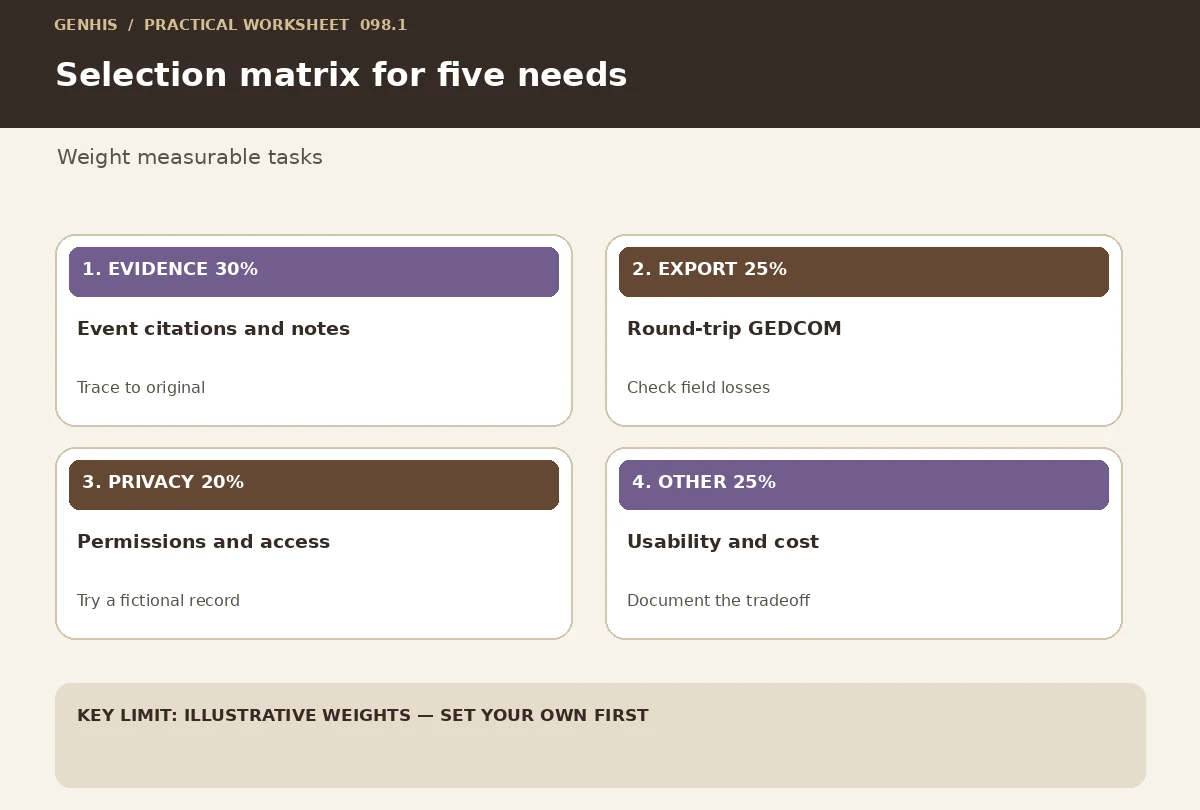
Assign weights before installing anything, such as 30 percent evidence and citation fidelity, 25 percent export and restore reliability, 20 percent privacy and sharing, 15 percent practical usability and 10 percent total operating cost. These numbers are an example, not a universal formula. Score each category against observed test outcomes with a short note and date. Use an identical invented dataset and identical tasks across all trial programs. An otherwise impressive tool should fail your selection if it cannot reliably perform a requirement you marked essential.
Calculate the full cost of ownership cautiously: subscriptions, renewals, separate mobile access, cloud storage limits, printing features and the effort required to clean up imports. Do not assume today’s trial interface or marketing offer reflects permanent capabilities. Verify pricing and platform compatibility at the provider’s own current documentation, but do not treat an affiliate blog ranking as independent evidence. When comparing two candidates with similar scores, prioritize reversibility and trustworthy source management over cosmetic preferences. A documented migration exit path is a feature you can test today.

Make a decision and establish an exit plan
Start with a pilot project rather than migrating the entire tree. Keep the original dataset unmodified, copy the supporting media, record installation and export versions, and select one application as your working authority. Set a reminder to perform a periodic export and restoration rehearsal. Document where copies are stored and who can access them. If a tool goes offline, changes its fees or alters collaboration rules, you should know how to move without abandoning citations or losing the original project.
A practical decision memo can fit on one page: current requirements, trials completed, defects observed, unresolved privacy concerns, expected cost and a reasoned choice. State plainly what the program does not do. For example, no package can adjudicate a parent relationship without independent evidence, and no application can promise every proprietary field will survive GEDCOM transfer. Choosing software is a stewardship decision about your family research, not a recommendation to purchase the product with the loudest advertisement. For the fuller picture, see our guide “GEDCOM Files Explained”.
More Genealogy Tool Guides
How We Research: Source Checks and Uncertainty
We evaluated feature-selection criteria against source-centered research practice, FamilySearch transfer cautions, and Library of Congress digital archiving advice. No commercial provider, price, proprietary benchmark or performance ranking is asserted. The weights and trial records are editorial examples.
Research and portability basis: The National Archives research guide frames source-based investigation. We checked GEDCOM version documentation and FamilySearch import limitations before devising the trial matrix. The Library of Congress archiving resources informed the backup criterion.
Vendor-independence statement: We did not purchase or benchmark any genealogy software, and the example scores do not describe real products. Read the site disclosure and verify vendors independently. Product choices require current privacy, compatibility, pricing and backup tests.
The ability to preserve documented facts, source citations, privacy, and a recoverable export matters more than display features alone.
No. Evaluate account access, sharing permissions, export options, provider terms, and independent backup practices.
No. Verify supported versions and conduct a trial import and export with a known sample.
No. Automated hints are leads. A relationship conclusion requires independently evaluated evidence.
Use fictional records in initial trials. Protect personal details until you have reviewed the tool’s policies and settings.