A good genealogy filing system should answer three questions without relying on your memory: which person or family does a document concern, where did the document come from, and what research question does it help answer? Start with one master home for your work, an unaltered copy of each acquired record, and a short description that joins the image to its source. You do not need expensive genealogy software to do this. A predictable folder tree, a spreadsheet, and deliberate backups can make a small project trustworthy and a large one maintainable. The goal is not to create beautiful folders; it is to prevent a document, citation, or unresolved relationship from becoming separated.
This guide deals with storage and retrieval, not the details of recording every unsuccessful search or writing a proof argument. Those belong in a research log and an evidence assessment. Here you will build a two-level filing approach, learn when to make a copy rather than move an item, and practice a recovery test. The worked names below are fictional and demonstrate a system, not actual ancestors or an archive discovery.
Separate Original Files From Your Working Interpretation
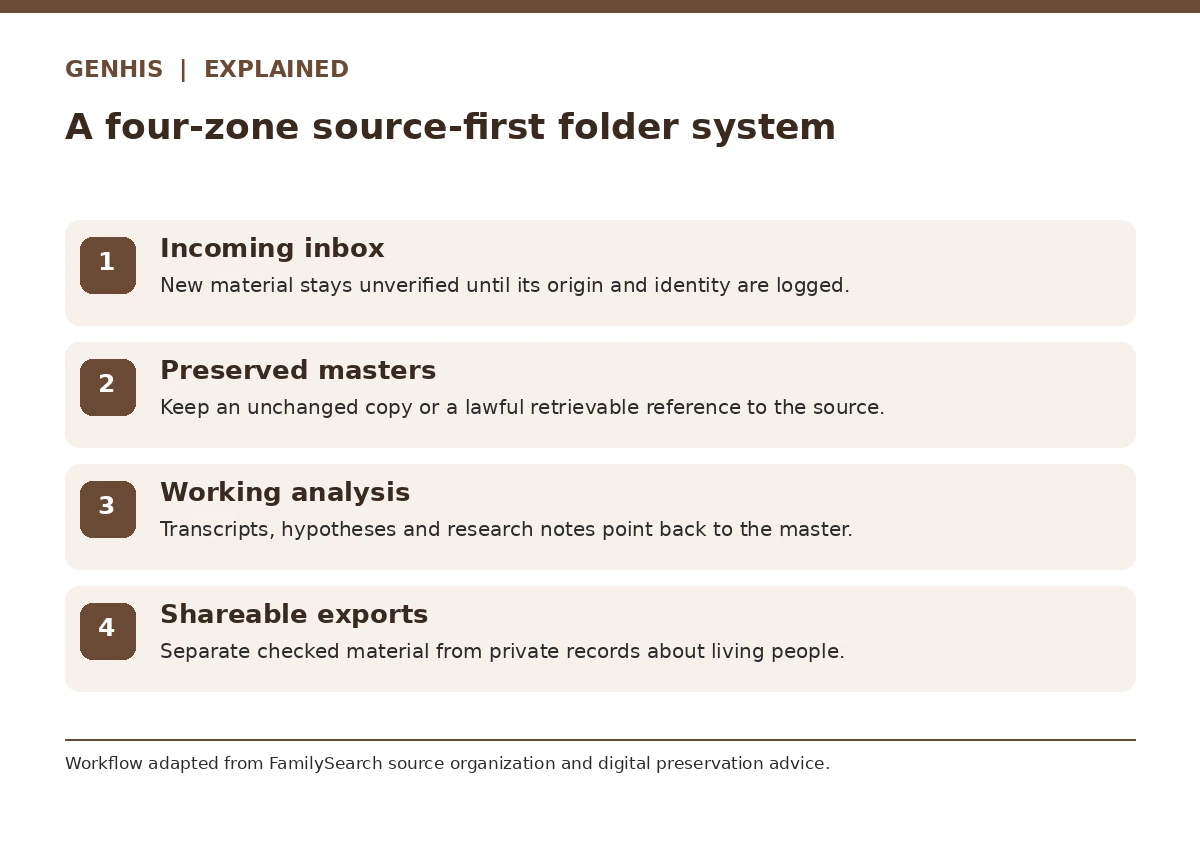
Make a top-level project directory with four clear destinations: incoming material, preserved source copies, research work, and exports for sharing. Put any newly downloaded scan in an inbox until it has been checked and identified. Preserve a master copy without drawing on it, cropping it, overwriting metadata, or silently renaming it multiple times. Place transcripts, image enhancements, and extracted facts beside a reference to that preserved master, not in its place. This distinction means an incorrect transcription can be fixed without losing the record that exposed the error.
Do not use the online family-tree profile as your only archive. A website can reorganize its interface, remove access to images, or change profile information; your locally managed source record still needs enough identification to be retraced. If an access agreement limits what you may download or redistribute, obey it and save an appropriately detailed citation or reference instead. Keep documents about living people out of public sharing folders, and manage permissions separately from files intended for publication.
Choose a Folder Structure That Handles Namesakes
A surname-only system often fails when unrelated families share a common name. For digital records, choose a stable family or person identifier, then add a place or date range to distinguish branches. For example, a folder labeled `BROWN-02_Ohio_1880s` can be more useful than a folder simply called `Brown`. Store a short index explaining what `BROWN-02` means. Use the same identifier in your genealogy software notes, research log, and file index. The identifier is a local organizing label; it is not a claim that the person is a proven relative.
Some records belong to several people, such as a household census or a probate file. Keep one master image and reference it from each person’s index. If your workflow requires duplicate convenience copies, label them as copies and ensure the citation points back to the same source. Create a clear location for unidentified or disputed records rather than forcing them into an asserted ancestral line. FamilySearch’s guidance on organizing source-box folders suggests grouping by ancestor, family, record type or place; these are options to adapt, not universal rules.
Name Digital Documents for Retrieval, Not Certainty
A useful filename combines a stable identifier, an approximate event date if known, a record type, and a brief repository clue. For a teaching example, `BROWN02_1891_marriage-register_collectionA_scan01.webp` indicates how the copy is organized; the sample does not claim that a specific marriage entry exists. If a date is not known, use `undated` rather than guessing. If a birth year is disputed, do not encode the disputed year as an established fact without a question marker in an accompanying index. Keep filenames readable across operating systems by avoiding slashes, unusual punctuation and extremely long folder paths.
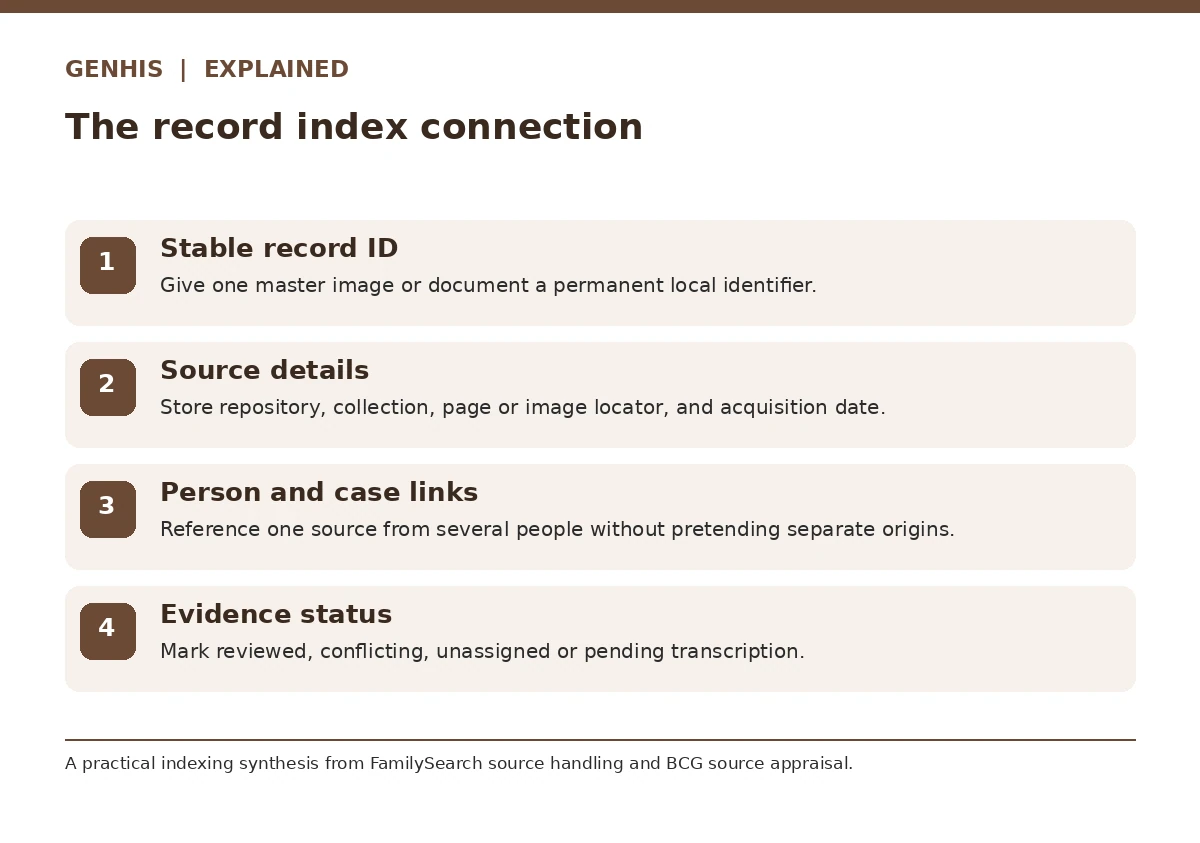
Create a sidecar record or index row with the original download name, acquisition date, repository, collection or catalog title, full citation, page or image reference where available, URL, permissions, and your permanent local filename. Do not assume a bare web link will always resolve to the same image. NARA’s records-management naming guidance supports descriptive, consistent and portable file naming; apply that principle to your research rather than copying its agency requirements as mandatory rules for families.
Build a Small Index That Connects Files to Claims
Set up an index with columns for file ID, person or family ID, record description, original repository, citation, event mentioned, status, and location. The status matters: `transcribed`, `needs image review`, `conflicts`, or `unattached` prevents an unexamined hint from appearing established. Record the physical box or folder location too when the document exists only on paper. The index is a map to the evidence, not a substitute for reading it. If a file pertains to several people, use additional rows referencing the same immutable file ID.
For example, imagine a sample marriage register mentions a witness with the same surname as the bride. Index the witness as an observed name, not automatically as a sibling. Link the scan to the bride’s case and create a separate research question about the witness. This protects the distinction between what the page actually records and what your interpretation proposes. Your research log should separately capture how you found the page and which search combinations did not find it.
Protect Research Against Accidental Changes and Loss
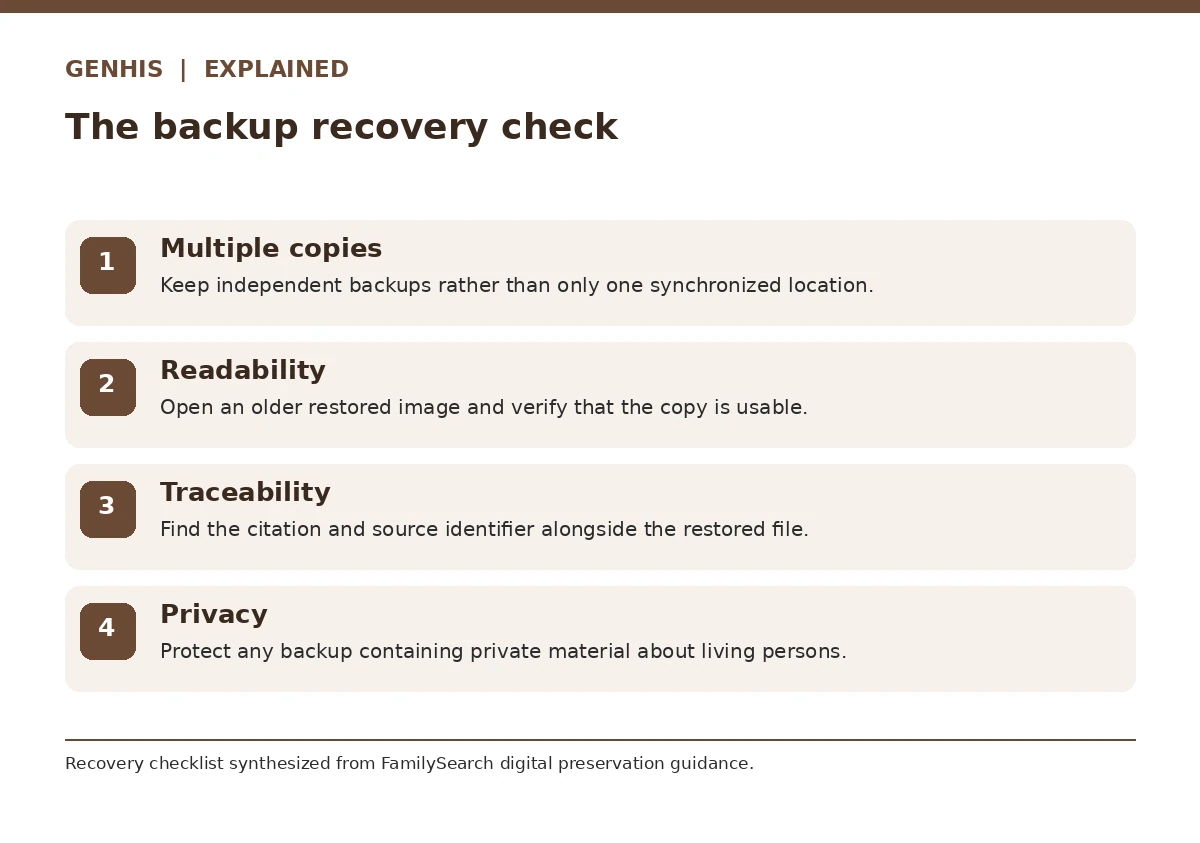
Maintain more than one copy of material you cannot easily replace, using different storage locations rather than a single computer and one attached drive. The FamilySearch digital preservation guidance describes the widely used 3-2-1 approach: three copies, two media types, with one away from the primary location. Choose a routine that you can sustain and encrypt or restrict backups containing sensitive material about living relatives. A cloud synchronization service may help with continuity, but synchronization alone is not a substitute for a separate recoverable version when accidental deletions can propagate.
Run a recovery test before you trust the system. Select an older image, open the backup copy, locate its source note, and verify that you can reconstruct why it was saved. Check that files remain readable and that no format conversion destroyed details that appear in the master. Add a dated note of the test and the next review date. If you cannot find the citation after recovery, the research is not adequately preserved even if the picture itself survived.
Use a Weekly Filing Routine That Stays Small
At the end of each research session, move the downloads from the inbox to their durable location, assign identifiers, create citations, and update the index. Flag material you have not yet examined rather than leaving it mixed with analyzed documents. Keep a separate list of questions to test; do not hide them inside filenames. Set a limit on the inbox such as processing it before the next major record-search session. A good routine turns filing into part of evidence quality rather than a separate weekend project.
You can decide whether to organize first by family, locality, or record type after testing how you retrieve five real sources. If you repeatedly seek records by county and era, an alternate locality index may be worth adding; avoid moving your only master every time a new category seems useful. The system succeeds if another researcher can follow the folder label to a record and its citation and understand why a relationship remains tentative. An efficient system is one you can consistently explain, not the most elaborate hierarchy.
How We Research and Verify Organizational Advice
The organizational method above synthesizes source-management guidance rather than claiming that any one archive requires this folder layout. FamilySearch’s source-box help describes permissible conceptual groupings; the U.S. National Archives discusses consistent digital file naming for institutional records; FamilySearch explains multiple-copy preservation. The filename and family examples are invented demonstrations, not identified records. Actual repository permissions, file formats, and backup options vary. This guide is educational, does not establish kinship, and does not claim a paid partnership. Our affiliate disclosure explains our site policy.
FamilySearch Source Box — FamilySearch Help Center explains organizing its Source Box by person, family, place or record type and documents the website folder feature.
National Archives Digital File Naming — National Archives digital records-management naming guidance recommends descriptive, consistent, portable file and folder names; it is not mandatory for private genealogists.
FamilySearch Digital Preservation — FamilySearch advises preserving multiple copies of digital family material, including an offsite copy, and periodically reviewing backups.
BCG Source Appraisal — BCG explains how to assess original and derivative records, informant knowledge, source independence and evidence roles in genealogical analysis.
Either can work. Use a stable identifier plus place or time qualifiers when names repeat, and add an index to connect shared records.
Preserve the acquired master and log its original name. Create a descriptive managed filename or convenience copy with a retrievable source ID.
Keep one master and link multiple person or case index rows to it; label any convenience copies to avoid inconsistent versions.
Not by itself. Use separate recoverable versions and different storage locations, and verify you can actually restore files and citations.
No. Store sensitive living-person material with restricted access and share only after checking consent and disclosure needs.