A chromosome browser is a visual comparison of DNA segments: it shows where a tested person’s reported matches line up along numbered chromosomes. It is useful for checking whether two match reports refer to the same region, but it cannot identify a named ancestor from the colored bars. Nor does two bars overlapping with you automatically establish that those two other testers share that segment with each other. This guide teaches how to read a browser display and decide when more comparison is justified, without assuming that every company provides identical tools.
Identify what is actually on the chromosome display
A typical segment display shows a chromosome number, a visual track, colored matching segments, and an indication of the matched tester. Detailed views may show start and end genomic coordinates, genetic-map length in centimorgans, and counts of tested markers. Coordinates locate a region on a version of the reference genome; cM values describe genetic-map distance related to recombination. These are different measures. A longer-looking bar on a rescaled picture is not necessarily the strongest genealogical evidence, so inspect the numerical fields and any legend.
A browser does not directly label every ancestral parent of a segment. Most testers have maternal and paternal copies of each autosome, and the display may combine them when showing similarities to individual matches. That means the bar’s position alone does not tell you whether the match comes through your mother’s or father’s family. Providers also differ in whether the tool exists, how many matches can be compared, and which sizes of segments appear. Read the service’s current documentation instead of applying old screenshots literally.
Work through a safe first browser comparison
Start with one documented relative whose family-tree connection is independently supported, then select the comparison view if your provider actually offers one. Record the tested person’s private research ID, report date, chromosome number, interval start and end, segment cM, and testing site. Do not upload raw DNA to an unfamiliar service to follow a visual tutorial. Compare a second known match and note whether its reported interval overlaps the first one on the same chromosome. This is an observation that deserves follow-up, not a triangulation result yet. Our guide “DNA Triangulation Explained” goes into more detail.
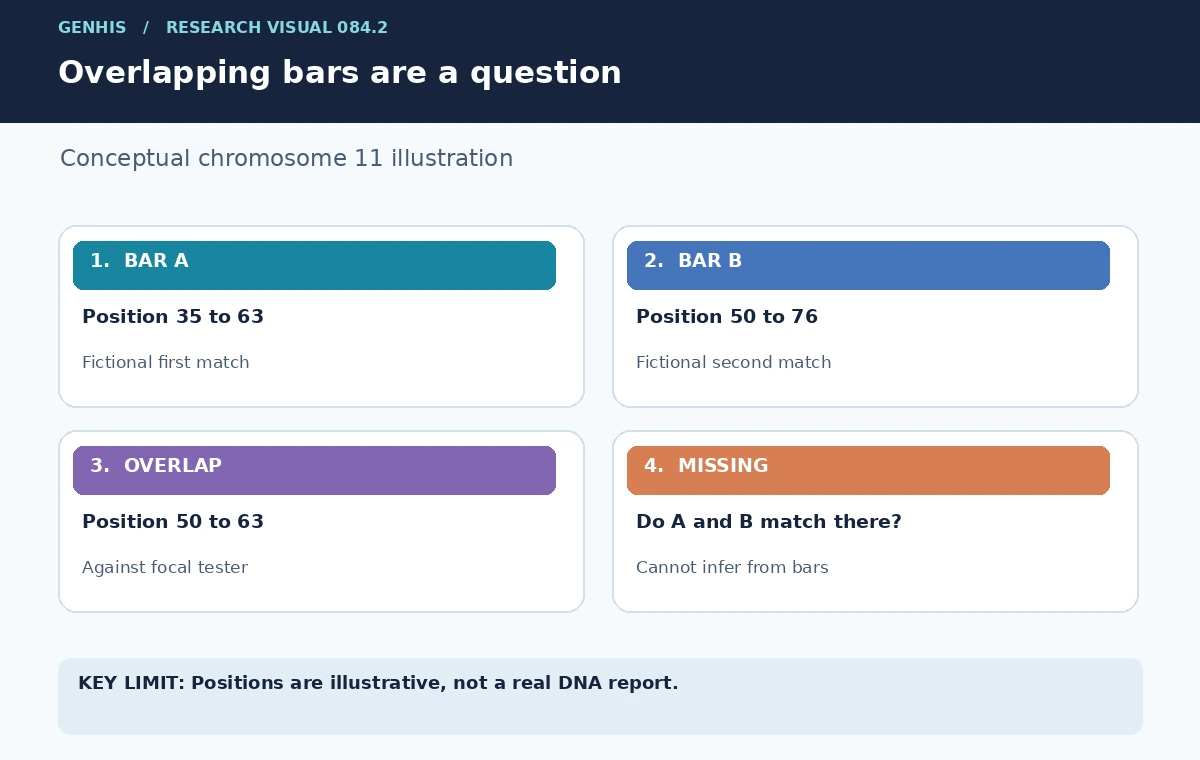
For instance, an invented illustration may show the first colored bar spanning positions 35–63 on chromosome 11 and another from 50–76. Their overlap is 50–63 in the illustration’s arbitrary units. A viewer can correctly say that two matches are reported in overlapping coordinates relative to the focal tester. They cannot say that the two matches inherited this region from a specific ancestral couple. To go further, one would need additional parental-side information and suitable mutual-segment comparisons, with participant permission and adequate technical quality.

Know when colored overlap is not enough
FamilyTreeDNA distinguishes a Chromosome Browser, which can reveal segments overlapping against the focal tester, from its Matrix, which helps assess whether selected matches also match one another. A further complication is that B and C may match each other somewhere else in their genomes. A generic shared-match indicator therefore still may not establish mutual sharing in the same interval.
Short matches demand additional caution because identical-by-state patterns, detection thresholds and phasing ambiguities can affect what is shown. Avoid inferring certainty from a color legend, from the number of matching bars, or from one service’s relationship prediction. Keep a column that distinguishes ‘overlap observed’, ‘mutual match shown’, ‘same segment checked’, and ‘ancestral connection documented’. Each label answers a different question. If the platform does not provide one of the necessary comparisons, write ‘not available’ instead of inventing a result.
Export a research question instead of a genetic conclusion
The browser is most helpful when it directs a specific record search. If two reliably documented cousins share an interval with you, ask what known line their pedigrees have in common and whether another independent cousin might help test that line. Do not rename an interval after an ancestor merely because a public user tree uses that surname. Confirm the candidate ancestor’s children, marriages and migration by checking original documents. Keep reference genome build and platform next to any coordinate so old and new displays are not accidentally compared as if identical.
A compact observation sheet can have six columns: focal test ID, match ID, chromosome and coordinates, cM, parental-side status, and next documentary task. Include an explicit ‘unverified’ option. You do not need to collect more data than the specific family-history problem requires. Where a company does not offer a chromosome browser, shared-match clustering or a documented-tree comparison may be a more realistic first step. Do not present any browser as a universal gateway to identifying unknown living relatives.
Before making a public claim, write a one-sentence interpretation next to each image: ‘The provider reports overlap between these two testers and me on chromosome X; mutual sharing between those testers has not been checked.’ This kind of caption makes the limits of the image legible to another researcher. Where the browser hides matching thresholds or detailed coordinates, do not supply them from a different website. An incomplete observation is still usable for planning a source search as long as the missing measurements are explicitly marked unknown. Our guide “Chromosome Mapping for Genealogy” covers how to label only proven lines.
More DNA Genealogy Guides
How We Research browser interpretation limits
This explanation checks the provider-side FamilyTreeDNA guide to interpreting Family Finder matches and its Matrix/Browser comparison. We also use ISOGG’s description of chromosome-mapping limits when discussing phase and misleading short segments. Because interfaces may change, the article describes durable information types instead of promising specific current buttons or a universal interface on all testing sites.
The fictional chromosome bars and numbers in the visual explanations are instructional, not a real person’s genetic output. No medical interpretation, ethnicity conclusion or living-person inference follows from this tool. Keep private match identifiers and contact details outside public examples and ask for consent before using another person’s genetic results. Our affiliate disclosure provides transparency; no paid comparison service is endorsed or needed for the basic method.

They display reported shared segments between a focal tester and selected matches, according to the platform and comparison mode.
No. Coordinates locate sequence positions on a genome build; cM measures genetic-map distance associated with recombination.
No. A mutual same-region comparison is needed, and bars may reflect distinct maternal or paternal chromosome copies.
No. Tool availability and export options differ among providers and can change; confirm the current features in the relevant help documentation.
Not by itself. It provides segment observations that can be combined with documented family lines and careful comparison.